
Top 11 AI Frameworks and Tools

• 11 min
I'm a content specialist at Fively keen on writing fresh articles that can help out business and tech specialists. I love to conduct research, hold interviews, and spotlight sophisticated tech issues.
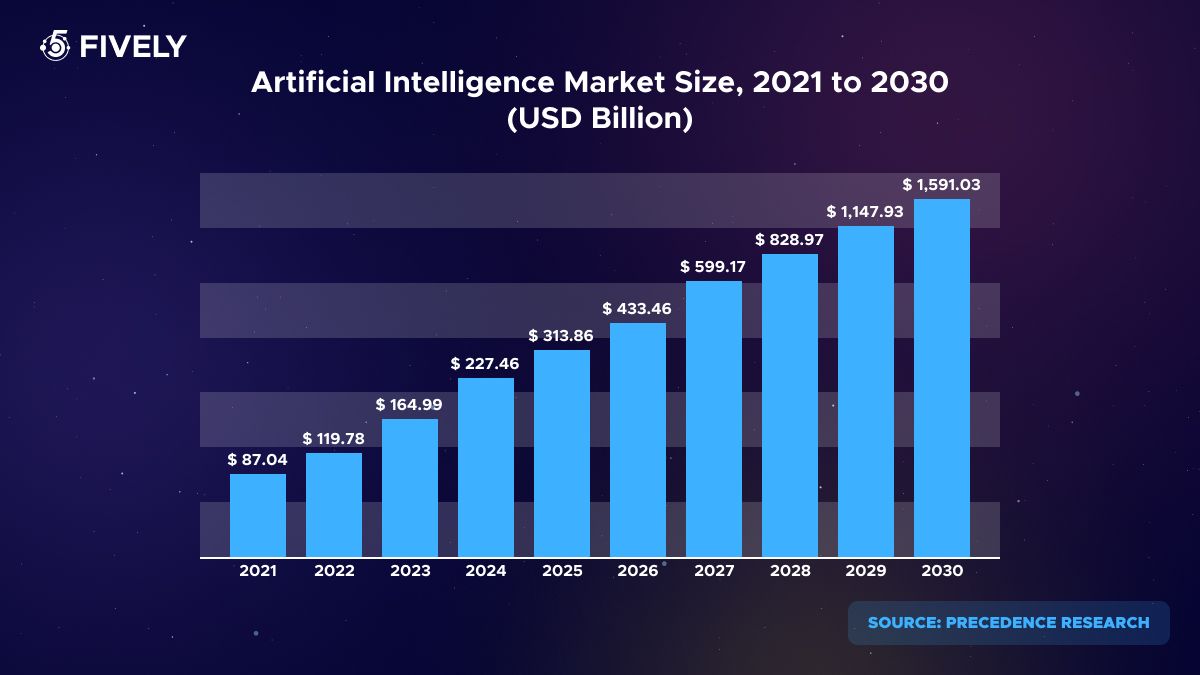
In our fresh article, discover the top 11 popular artificial intelligence and machine learning frameworks to build robust and flexible architectures for your AI-powered apps.
As AI and ML continue to burgeon, an array of tools and frameworks have been developed to aid businesses in harnessing their potential. With countless options available, it can be overwhelming to determine which tools are most apt for specific tasks. Here at Fively, we've compiled a concise list of the top 11 tools and frameworks to guide you in making informed decisions.
Let's journey through each of these indispensable tools with our top ML and AI specialist Andrew Oreshko!
List of AI Frameworks & Tools
List of Popular AI Agents
TensorFlow
It’s an open-source library for dataflow and differentiable programming developed by the Google Brain team. It's primarily used for machine learning applications and deep neural network research.
Languages: Python, C++, and Java
Platforms: Linux, macOS, Windows, Android, iOS (via TensorFlow Lite)
+ Highly flexible and modular;
+ Excellent community support;
+ Scalable for both small and large applications;
- The steeper learning curve for beginners;
- Some operations can be less intuitive compared to other ml frameworks.
“TensorFlow, as one of the market leaders, is ideally suited for large projects due to a developed ecosystem of products (TensorFlow Hub, TensorFlow Serving, TensorFlow Lite), great community, detailed documentation, and lots of code examples over the internet.”
Sci-kit Learn
A free machine learning library that integrates seamlessly with the Python language. It's suitable for various machine-learning tasks, including classification, regression, and clustering.
Languages: Python
Platforms: Linux, macOS, Windows
+ Comprehensive library for machine learning algorithms;
+ Strong documentation and community support;
+ Ease of use and integration;
- Not tailored for deep learning;
- Doesn't support GPU acceleration.
“Ski-kit Learn, just like Pandas, is very convenient, and has a bunch of ready-made packaged solutions.”
Pandas
A fast, powerful, and flexible open-source data analysis and data manipulation library.
Languages: Python
Platforms: Linux, macOS X, Windows
+ Comprehensive data manipulation tools;
+ Seamless integration with many other data science tools;
+ Strong community support;
- Memory consumption can be high;
- Some operations can be slower than pure NumPy.
“Pandas attracts with its user-friendly interface. However, it should be noted that it can have problems when working with big data science projects (because it loads all the data it works with into RAM). There is a similar technology called Dask, which can parallelize its work - it’s really interesting to see its further development.”
NumPy
A library for the Python language, allowing support for large, multi-dimensional arrays and matrices along with a vast collection of high-level mathematical functions.
Languages: Python
Platforms: Linux, macOS X, Windows
+ Efficient mathematical operations;
+ Broad functionality for numerical tasks;
+ Seamless integration with other libraries;
- Not specifically tailored for machine learning.
“NumPy does all the computational heavy-lifting for working with vectors and matrices. This is needed both in Pandas (it is built on NumPy), and in Scikit-Learn (since it is M-library, here the speed of calculations is important, which is what NumPy gives us).”
 Services Account
“Sci-kit Learn, Pandas, Numpy - they are the core of ML projects: convenient both for research and for building production-ready systems, they will continue to be used everywhere and to develop further.”
PyTorch
Developed by Facebook's Research lab, it's a dynamic computational graph-based framework often compared to TensorFlow. It allows developers to use GPU acceleration for computations.
Languages: Python, C++
Platfroms: Linux, macOS X, Windows
+ Dynamic computational graph;
+ Intuitive and more pythonic;
+ Strong support for GPU acceleration;
- Slower than some counterparts due to dynamic computation.
“PyTorch, another market leader with a large community and lots of code examples, is ideal for smaller projects and for research.”
Keras
It is an open-source neural network library written in Python. It's known for being user-friendly and modular, acting as an interface for TensorFlow and Theano.
Languages: Python
Platforms: Linux, macOS X, Windows (depends on the backend: TensorFlow, Theano, etc.)
+ User-friendly API;
+ Modular and extendable;
+ Supports multiple backend neural computation engines;
- Performance can sometimes be suboptimal;
- Dependency on TensorFlow or Theano as a backend.
“Keras can run on top of TensorFlow or Theano. Keras is, in fact, a top-level API for these backends (TensorFlow/Theano), which simplifies model development.”
Theano
An open-source numerical computation library that lets developers efficiently define, optimize, and evaluate mathematical expressions.
Languages: Python
Platforms: Linux, macOS X, Windows
+ Highly efficient for numerical tasks;
+ GPU acceleration support;
+ Tight integration with NumPy;
- Development has been halted;
- Not as beginner-friendly as some other options.
Services Account
Google ML Kit
A mobile SDK that brings Google's machine learning capabilities to Android and iOS apps, with powerful, yet easy-to-use solutions.
Languages: Java (Android), Swift/Objective-C (iOS)
Platforms: Android, iOS
+ Easy to integrate into mobile apps;
+ Pre-trained models available;
+ Supports custom TensorFlow Lite models;
- Limited to mobile app development;
- Some advanced use cases may need further fine-tuning.
Caffe 2
Now we move on to machine learning and deep learning frameworks. The first one is Caffe 2: an open-source deep learning framework with modularity and speed in mind. Developed by Facebook, it's the successor to the Caffe framework.
Languages: Python, C++
Platforms: Linux, macOS X, Windows, Android, iOS
+ Highly modular and performant;
+ Suitable for mobile deployment;
+ Strong community and support;
- The steeper learning curve for beginners;
- Less popular compared to TensorFlow and PyTorch.
Microsoft CNTK
The Microsoft Cognitive Toolkit, or CNTK for short, is a deep learning framework developed by Microsoft. It is known for its efficiency at scale.
Languages: Python, C++
Platforms: Linux, macOS X, Windows
+ Efficient for large-scale datasets;
+ Strong support for recurrent neural networks (RNNs);
+ High performance and scalability;
+ Less intuitive API compared to some counterparts;
+ Limited community support.
MxNet
A deep learning framework designed for both efficiency and flexibility. It allows developers to mix symbolic and imperative programming.
Languages: Python, C++, Julia, R, Scala, Perl
Platforms: Linux, macOS X, Windows, iOS, Android
+ Supports multi-language APIs;
+ Highly efficient and scalable;
+ Mix of symbolic and imperative programming;
+ Lesser community support compared to TensorFlow and PyTorch;
+ Some parts of the documentation might be lacking.
Top AI Frameworks and Libraries Comparison
With a plethora of options available, it's crucial to choose the right one that aligns with your project requirements, expertise, and platform preferences. In the table below, we've collated the main aspects of some of the leading tools, providing a side-by-side comparison to aid in your decision-making process. Let's get a birds-eye view of these tools and discern the subtle nuances that set each apart.
AI Agents for Development and Automation
As generative AI continues to evolve, a new category of tools has emerged — AI agents. Unlike traditional frameworks, these tools actively assist in writing code, making decisions, automating workflows, and even building entire applications. Below are some of the most impactful AI agents shaping modern development workflows.
GitHub Copilot
An AI pair programmer that integrates directly into IDEs and provides real-time code suggestions based on context and comments. It analyzes the surrounding codebase and developer intent to generate highly relevant completions, reducing cognitive load during development.
Copilot can also assist with writing tests, generating functions from comments, and speeding up onboarding for new team members. Its tight integration with tools like VS Code and JetBrains IDEs makes it a natural extension of the developer workflow. Over time, it adapts to coding patterns, helping maintain consistency across the codebase.
+ Speeds up boilerplate coding;
+ Seamless integration with popular IDEs;
+ Improves productivity for everyday tasks.
- Can generate incorrect or suboptimal code;
- Limited understanding of large-scale architecture.
Best for: Day-to-day coding, autocomplete, and reducing repetitive work.
Cursor AI
A powerful AI-first IDE that transforms prompts into working code, offers refactoring suggestions, and integrates multiple top-tier models. Its natural language processing capabilities allow developers to operate at a higher abstraction level, where entire features can be generated and iterated through conversational prompts.
Cursor supports multi-file context awareness, enabling it to understand relationships across a project and suggest more accurate changes. Its built-in chat and agent-like workflows make it possible to plan, implement, and debug features without leaving the IDE. The tool is especially effective for teams adopting AI-driven development workflows and rapid iteration cycles.
+ Multi-model access (Claude, GPT, etc.);
+ Strong prompt-to-code capabilities;
+ Real-time feedback and refactoring.
- Requires adaptation to new workflow;
- Can be overkill for simple tasks.
Best for: Full-cycle development acceleration and AI-driven coding workflows.
Claude
An advanced AI assistant known for deep reasoning, code analysis, and structured output.
Claude excels at understanding complex systems, making it particularly useful for architecture design and long-form technical planning. It can generate detailed documentation, break down large tasks into manageable steps, and suggest improvements in code clarity and maintainability.
The model is also strong in test generation, helping ensure code quality and reliability in production systems. Its ability to handle large context windows makes it ideal for reviewing entire modules or systems at once.
+ Excellent for architecture and planning;
+ Strong at refactoring and documentation;
+ Handles complex multi-step tasks;
- Slower for quick snippets;
- Requires well-structured prompts.
Best for: Complex logic, system design, and technical documentation.
Lovable
A no-code platform that turns natural language prompts into full applications with UI, backend, and database logic. It allows non-technical users to transform ideas into working products without needing development experience.
Lovable can generate full application flows, including authentication, data storage, and user interfaces in minutes. This makes it especially useful for rapid experimentation, early-stage startups, and internal tools. While not a replacement for full engineering teams, it significantly lowers the barrier to entry for product creation.
+ Extremely fast MVP creation;
+ No coding required;
+ Great for validating ideas;
- Limited customization for complex systems;
- Not ideal for production-grade scaling.
Best for: Prototyping, MVPs, and idea validation.
Tabnine
A privacy-focused AI development tool supporting multiple languages with context-aware suggestions. It is designed with enterprise needs in mind, offering on-premise deployment and strict data control options.
Tabnine enhances developer productivity through intelligent autocomplete, documentation hints, and test-case suggestions. Its lightweight integration ensures minimal disruption to existing workflows while still delivering measurable efficiency gains. The tool is particularly valuable in regulated industries where data security is a top priority.
+ Strong privacy and on-prem options;
+ Supports 80+ languages;
+ Reliable autocomplete and test suggestions;
- Less powerful than newer AI agents;
- Limited reasoning capabilities.
Best for: Enterprise environments and sensitive codebases.
Codex
A versatile AI model used for ideation, debugging, and full-cycle development support.
It helps developers quickly explore different implementation approaches and validate technical decisions. Codex can generate code snippets, explain complex logic, and assist with debugging issues across various languages.
Through ChatGPT, it becomes an interactive partner for planning features, writing documentation, and solving edge cases. Its flexibility makes it suitable for both early-stage discovery and ongoing development tasks.
+ Flexible across many use cases;
+ Great for brainstorming and debugging;
+ Strong general-purpose capabilities.
- Requires manual integration into workflows;
- Not IDE-native by default.
Best for: Discovery, debugging, and cross-domain development tasks.
Junie
An advanced AI assistant from JetBrains that accelerates development with smart completions and architectural suggestions. It is deeply integrated into JetBrains IDEs, providing context-aware recommendations based on project structure.
Junie helps developers maintain consistency across large codebases by suggesting best practices and reusable patterns. It can assist in refactoring, generating boilerplate code, and improving overall code quality. The tool is especially useful for teams working on long-term, scalable projects within the JetBrains ecosystem.
+ Deep IDE integration;
+ Great for structured development;
+ Supports scaling projects;
- Ecosystem-dependent (JetBrains tools);
- Still evolving.
Best for: Teams using JetBrains IDEs and structured enterprise development.
n8n
A workflow automation tool that connects APIs, databases, and services into dynamic pipelines with AI-powered logic. It enables data scientists, developers and non-developers to automate repetitive processes without writing extensive backend code. With support for conditional logic and AI actions, n8n can orchestrate complex workflows across multiple systems.
It integrates easily with popular tools, making it ideal for building internal automation and data pipelines. Its flexibility allows teams to streamline operations and reduce manual effort across business processes.
+ Powerful automation capabilities;
+ Flexible integrations;
+ Supports AI-driven workflows;
- Requires setup and maintenance;
- Not focused on frontend/product development.
Best for: Backend automation, integrations, and business process orchestration.
AI Agents Comparison
How to Choose the Right AI Agent
Of course, all of the modern AI agents are robust, fast, and interchangeable with each other, but still we recommend the following scheme:
- For daily coding: GitHub Copilot or Tabnine
- For full AI-driven workflows: Cursor AI
- For architecture & complex tasks: Claude
- For MVPs without coding: Lovable
- For automation & backend workflows: n8n
- For general support & flexibility: ChatGPT (Codex)
- For JetBrains users: Junie
Popular Machine Learning Frameworks: Final Thoughts
In the realm of Artificial Intelligence, the apprehension surrounding frameworks often stems from the fear of the unknown. Many professionals are wary, thinking that these tools might overshadow or replace their roles. However, solutions like GhatGPT or professional artificial intelligence frameworks like we described above in this article, should be perceived as our allies in building great custom software.
The only question that arises is how to choose the tool that fits your project needs. Here’s how Andrew Oreshko, Leading AI & ML Specialist at Fively, comments on this:
There are 2 market leaders now: TensorFlow, which is best for large projects, and PyTorch, which is ideal for smaller projects and for research. Both tools have great communities, documentation, and lots of code examples. As for Sci-kit Learn, Pandas, and NumPy — they are the core of ML projects: convenient both for research and for building production-ready systems, they will continue to be used everywhere and to develop further. But, when choosing the tool, you should rely on the experience of your developers and the needs of your business.
Just as a masterful artist uses brushes to create masterpieces, tools are instruments that, when wielded with expertise, can lead to revolutionary advancements. They complement our human capabilities, harnessing the power of automation and data-driven insights, while we maintain the reins of creativity, strategy, and intuition.
If the world of AI intrigues you, or if you're contemplating leveraging these tools for your business aspirations, look no further. Our seasoned professionals at Fively are adept at integrating AI seamlessly into diverse projects, so don’t hesitate to contact us.
Together, let's craft the future!
Services Account
Need Help With A Project?
Drop us a line, let’s arrange a discussion


